Showing posts with label net application developer. Show all posts

Monday, 26 December 2011

Caching: Improving ASP.NET site performance


We had already given a few glimpses about caching in ASP.NET a few weeks ago. The performance of a website in ASP.NET has always been a catchy issue. The performance of the website is the key requirement for any application or piece of code that you develop. And for any website developed with the purpose of critical mission, Caching is the way to go to significantly enhance the response time of your website.

Caching is basically a process of storing some frequently used data on the server to fulfill subsequent requests. The ASP.NET developers will discover that grabbing data or objects from memory is much faster than recreating the web pages or items contained in them from scratch.]

A properly mounted caching approach will certainly result on better performance and scalability of your website. But then, improper use of caching will actually downgrade your website or slow down the response time, as well as consume lots of server performance and memory usage. So, the good ASP.NET programmers use caching when one has infrequent chance of data or static content of web page.

At SPEC INDIA, our trained team of ASP.NET developers are eager to make very smart and secure use of Caching in ASP.NET programming, thus to ensure the authentication to the browser sessions. If you have any requirement or queries, feel free to drop an email at our id lead@spec-india.com, we will be happy to assist you.

Thursday, 15 December 2011

ASP.NET – Client-side Caching

The performance of an ASP.NET application can certainly be improved if the data – which is accessed frequently and requires comparatively more time to create – is stored somewhere. To increase the performance of an application in these kind of situations, ASP.NET provides data caching using two basic mechanisms.

1.    Application Cache
It is used to store the arbitrary data in memory. It is very similar to using the application state. The data here in nature is more volatile, means that it is stored temporarily only at the specified location. The ASP.NET programmers can also configure application caching to notify your application.

2.    Page Output Cache
This type of caching is typically used for server applications and it enables the ASP.NET programmers to store the rendered HTML directly. This stored HTML is served in response to the subsequent requests for the same page. It enables one to cache the mobile version of the page too.  As compared to the application caching, the output caching can be customized that can store data on any data storage device.

Apart from this 2, there also can be the 3rd type of caching called as Fragment Caching. This is used to cache the information at a structure level.

At SPEC INDIA, our trained team of ASP.NET professionals takes care of all the requirement of Clients pertaining to the customized development of the software or a website. You can always send your enquiries at our email id lead@spec-india.com. We will be happy to assist you with all our knowledge base.

Wednesday, 14 December 2011

IIS Express: Express Edition of IIS Web Server


The ASP.NET development tools are getting better and better these days with latest releases from Microsoft. But Microsoft is now also coming out with a new web server to support all ASP.NET developers’ benches with the most new launch: IIS Express.

Before IIS Express, the ASP.NETdevelopers have two points for testing your sites against a web server prior to IIS Express:
1, IIS Web Server – Windows in-built function
2, Visual studio’s in-built ASP Development Web Server
Both are pretty good at their places, but as a developer, you might need something at times which requires addition of capabilities of these both. Now, with IIS Express … you can have the Web Server that is easy to setup and install, and offers a full set of IIS Web Server functionality. Some of the nice features of IIS Express range as:

Ø  No specific requirement for Admin account to run and debug applications in ASP.NET
Ø  It can be installed side-by-side along with IISWeb Server/ASP Development Server
Ø  It works well with Windows XP and up

Friday, 9 December 2011

What makes the ASP.NET websites slow?


With Christmas holidays approaching, almost all the Companies will wish their ASP.NET websites to be at the top of Google rankings, and have the minimal loading times. The speed of the website directly affects bounce ratese, conversion rates, revenue, user satisfaction, SEP and virtually every other business metric worth to be counted.

Here are some of the considerations that the ASP.NET developers should consider always to make the loading time of their webpage as faster as possible:
    Too many HTTP requests
    Minimal Client-side (front-end) processing
    Too many bytes
    Low number of parallel requests (separate query strings)
    Failure to use a global network
    Failure to influence the browser cache/local storage
    Third-party widgets and API integrations
and so on…

At SPEC INDIA, our well-trained team of ASP.NET developers always takes care to avoid these mistakes, because ultimately they hinder in conduction of the marketing activities of the website as a whole. For this, we keep the architecture of the websites very SEO friendly right from the beginning.


Thursday, 8 December 2011

Validation Server Controls in ASP.NET

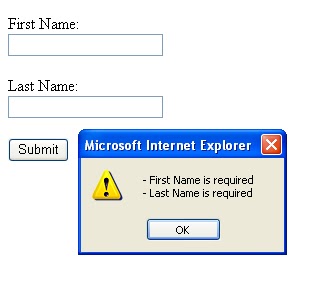
In this article, we will discuss like how the ASP.NET validation controls work.


You may check out any cool good website developed using ASP.NET, you will notice that they are filled with forms that clearly execute a lot of handwritten code to perform validations. Note that the validation code is not particularly heavy or bulky to write… it just needs to support the main code and the data-entry types to their original formats.

The validation server control is used to validate the data of an input control. If the data does not pass the validation, it will display an error message to the User, All the scripts cannot be always present in the Client browsers and can be bypassed by malicious users. It is necessary, hence, to implement the same checks on the server anyway, to ensure the smooth operation of the website.

Here are a list of the classic validator controls and their description:
CompareValidator; Compares the value of one input control to the value of another input control or to a fixed value CustomValidator; Allows you to write a method to handle the validation of the value entered RangeValidator; Checks that the user enters a value that falls between two values RegularExpressionValidator; Ensures that the value of an input control matches a specified pattern RequiredFieldValidator; Makes an input control a required field ValidationSummary; Displays a report of all validation errors occurred in a Web page

At SPEC INDIA, our trained team of ASP.NET programmers always takes care of putting server-side as well as the Client-side validations. This is a very much kind of routine process, to ensure the website with all the possible validation controls.

Friday, 25 November 2011

Breakpoints: Debugging in ASP.NET

Breakpoints, are places in the code of a program, where the debugger wills stop the execution of the application. It then displays the state of the application’s variables, and then the ASP.NET programmers can step through the code. Breakpoints have many sound features and properties. Using these features, one can control and modify the behavior of the breakpoint. These properties are ‘Hit Count’, ‘Condition’, ‘Action’, and ‘Filter’.


Advantages of Breakpoints:

    As they are not actually the statements in the code, they produce no extra code, and also do not change the size of the code file.
    A breakpoint can be set/disabled without alteration in the source code.
    Breakpoints are not actual source code one has to add to the program. It is something to be typed.
    One can manage all the breakpoints from the ‘Breakpoints’ window. This window can be displayed by clicking the ‘Debug/Windows/Breakpoints’ from the main menu.
    They give you ability to pause the execution of the program at any point, and then one can run the program line by line.